Scan & Search document scanner
Scan & Search turns paper into searchable, encrypted PDFs inside a vault: passports, IDs, insurance cards, tax letters, receipts. The text is read on your device, so you can later search for “passport” or a policy number without anything leaving your iPhone.
How it works
In a vault, tap + → Scan Document. Bunker opens Apple’s document camera, which finds the edges of the page, straightens it, and lets you scan several pages in a row.
Then you get a review screen:
- Drag pages to reorder them, or remove one.
- Pick a filter: Color, Grayscale or Black & White.
- Check the title. Bunker suggests one from the first line of text it reads, or a date like “Scan Mar 14, 2031”.
- Tap a type: ID, Passport, Insurance, Medical, Tax, Receipt or Other. Types work as filters later, and the Legacy Vault checklist uses them.
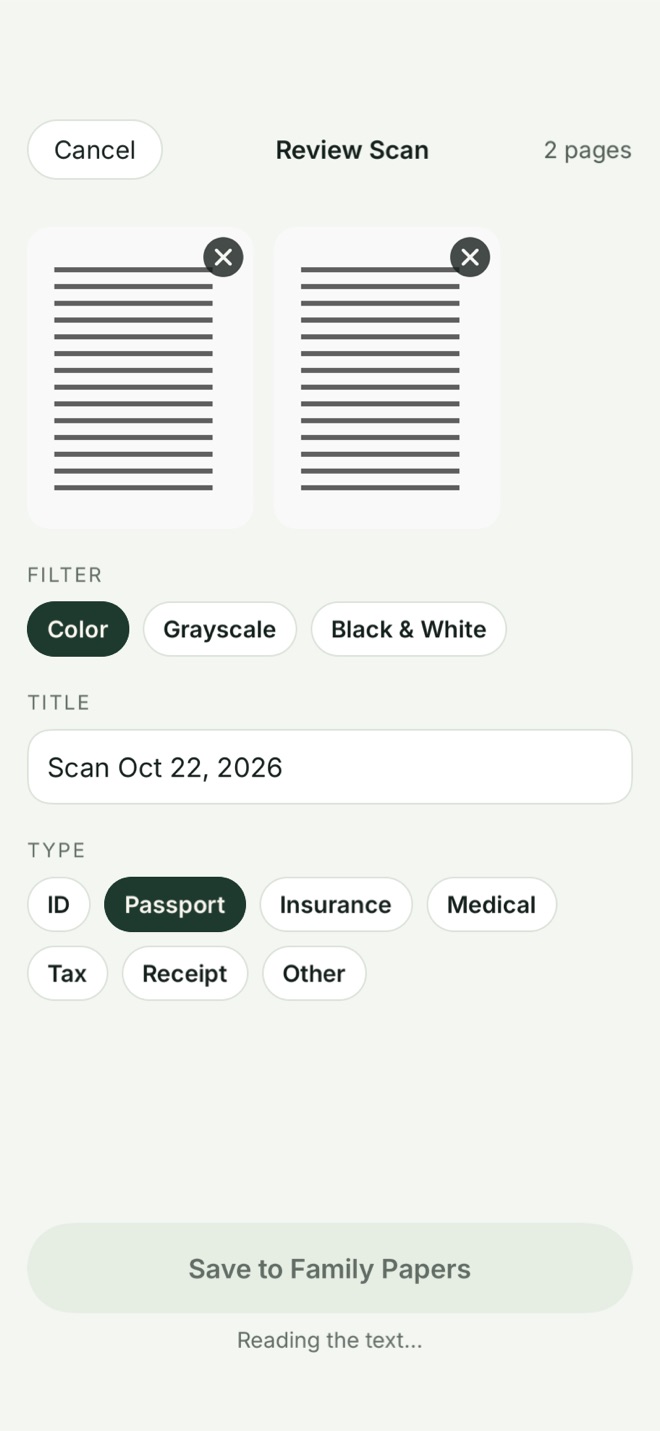
When you save, Bunker builds a PDF with an invisible text layer from on-device text recognition (Apple’s Vision framework, at its accurate setting, with automatic language detection). The PDF is created in memory and encrypted straight into the vault; it never exists as a plain file on disk. The review screen is hidden from screenshots and screen recordings, like the vault itself.
Within a few seconds of saving, the scan’s text is searchable from the vault’s search bar. See search for what else it covers.
What to scan first
If you’re not sure where to start, these are the papers people most often need in a hurry:
- Passport photo page and driver’s license, front and back.
- Health insurance card and any prescriptions you’d need abroad.
- Birth and marriage certificates.
- Car title, home insurance and the policy numbers for each.
- The last year’s tax return summary.
Scan in good, even light, and lay the page on a dark surface: edge detection and text recognition both work better.
On the Mac
Bunker on Mac has no camera of its own, but it uses Continuity Camera: choose File → Import from iPhone or iPad → Scan Documents, and scan with a nearby iPhone or iPad signed in to the same Apple Account, with Wi-Fi and Bluetooth on. The pages arrive in the open vault on the Mac.
What it protects against
- Copies of your documents sitting in Photos or Files, unencrypted and often synced.
- Sending documents to an online scanning or text-recognition service to make them searchable.
What it doesn’t protect against
- Someone who opens the vault. A scan of your passport is a copy of your passport; anyone with the vault’s Pattern sees it.
- What you export. An exported PDF is an ordinary file, readable by anyone who can open your files.
- Imperfect recognition. Handwriting, faded print and unusual fonts may be read wrongly or not at all, so search can miss them. The scan itself is still there.
Free or Pro
Scan & Search is free on every plan. We think a safe place for your papers shouldn’t be a paid extra.
Related
- Search inside a vault, including scanned text.
- Legacy Vaults, for papers your family may need one day.
- Where to keep important documents.
- Bunker on Mac.
Questions
Is the scanned text sent anywhere to be read?
No. Text recognition runs on your device with Apple's Vision framework. The text is stored inside the vault's encrypted index.
Is the scanner free?
Yes, on every plan. On Free, scans count toward the limit of 20 documents and notes in total.
Can I scan on a Mac?
Yes, through a nearby iPhone or iPad with Continuity Camera: in Bunker on the Mac, choose File → Import from iPhone or iPad → Scan Documents.
Does a scan ever exist as an unencrypted file?
No. The PDF is built in memory and encrypted directly into the vault.