Guide
How to back up a photo vault (and test the restore)
A photo vault backup is only real if you can restore it. That needs three things: an encrypted copy that lives off your phone, a recovery key written on paper that opens it without your phone, and a restore you’ve actually tried. Many lost vaults fail on the third: the backup existed, but nobody had tested it until the old phone was gone.
This guide uses Bunker for the concrete steps, because that’s the app we know. The checklist applies to any vault app.
The 3 things every vault backup needs
1. A copy that isn’t on the phone. If the phone is lost, broken or wiped, anything stored only on it is gone. The copy should be encrypted before it leaves the device, so wherever it lives, it’s unreadable without your key.
2. A way in that doesn’t need the phone. Your PIN or Pattern may depend on something stored on the device. A recovery key on paper is what opens the backup when the phone isn’t there, or when you’ve forgotten the Pattern.
3. A test. Restore it once, on another device, while the original is still safe. It takes 15 minutes and is the only way to know.
How Bunker covers them
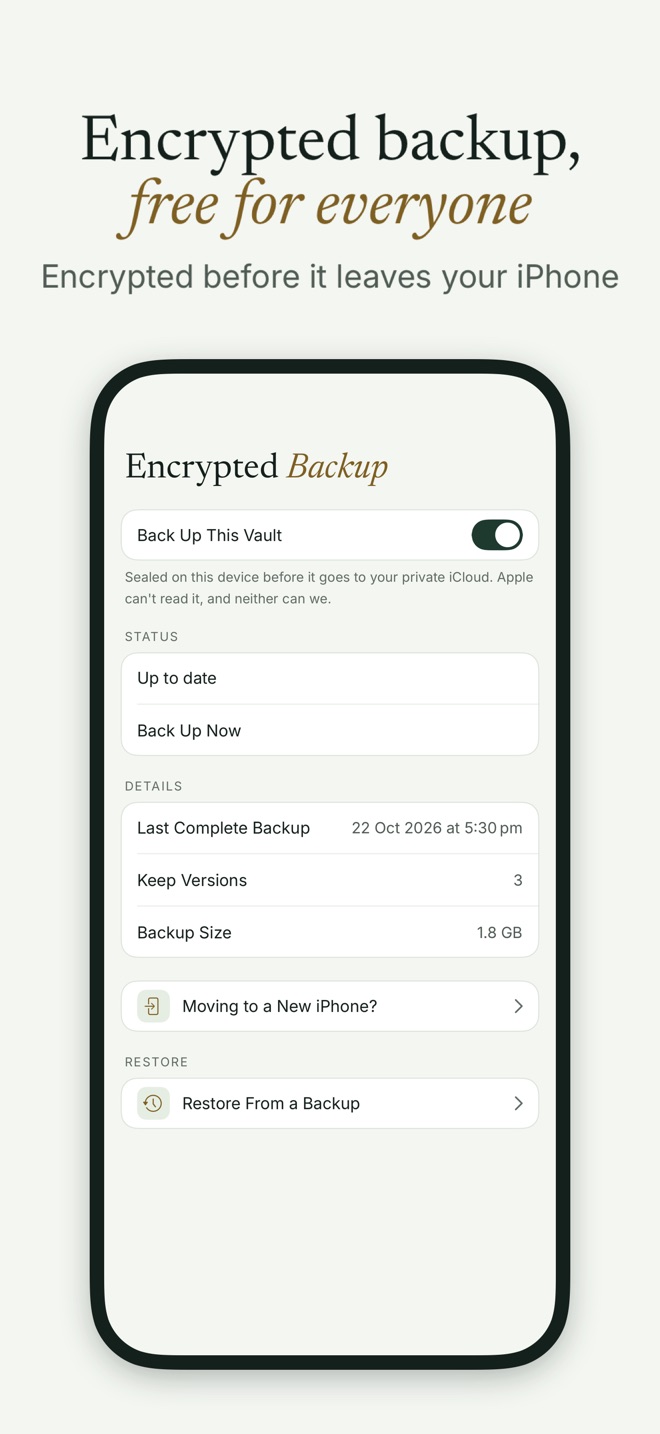
Encrypted Backup
- On by default for every new vault, and free on every tier.
- Encrypted on the device first, with keys that only the vault’s Pattern or Recovery Phrase can unlock, then stored in your own iCloud. Apple can’t read it, and neither can we, with or without Advanced Data Protection. See Advanced Data Protection, explained.
- Runs after you open a vault if 24 hours have passed since its last backup, on Wi-Fi by default. Back Up Now runs it any time. To allow cellular data, use App Settings → Backup → Use Cellular Data.
- Keeps the last 3 versions, and reuses unchanged parts, so a backup after a small change is quick.
- Tells you when it can’t. If iCloud is full, you’ll see “iCloud storage is full. Backup paused.” in Vault Settings → Encrypted Backup. If one item is damaged, the backup finishes everything else and offers Repair.
The Recovery Phrase
When you create a vault, Bunker gives you a Recovery Phrase: a generated sentence of about 12 words. With it, you can open the vault if you forget your Pattern, and restore it from iCloud on any device signed in to the same Apple Account.
- Write it on paper, exactly as shown. Bunker deliberately doesn’t offer Copy.
- Check your paper copy. Bunker asks you to retype the phrase from paper, word by word. If you chose “I’ll Do This Later”, a banner in the vault reminds you. You can do it any time in Vault Settings → Recovery Phrase.
- Print, if you prefer, for a clean sheet. Avoid keeping a PDF of it in iCloud Drive or email: a PDF is an ordinary file, and anyone who can open your files can read it.
- Store it away from the phone, like a passport. Someone who finds it can open that vault.
If you’re asked for the phrase by anyone, that’s a scam. Nobody from Bunker will ever ask for it.
Device backups
Bunker’s data is also part of your normal iPhone backup, encrypted the same way. What it brings back depends on the kind of backup:
| Device backup | Vaults open by Pattern after restoring? |
|---|---|
| Quick Start to a new iPhone | Yes |
| Encrypted Finder or PC backup | Yes |
| iCloud Backup with iCloud Keychain on | Yes |
| Unencrypted Finder backup, or iCloud Backup with iCloud Keychain off | No: restore each vault from Encrypted Backup with its Pattern or Recovery Phrase |
So Encrypted Backup plus your Recovery Phrase is the path that always works.
Test a restore in 15 minutes
You need a second device, an iPad or a spare iPhone, signed in to the same Apple Account with iCloud Keychain on, and without Bunker installed (or with nothing stored in it).
- On your iPhone: open the vault, go to Vault Settings → Encrypted Backup, and tap Back Up Now. Wait until it shows Up to date.
- Run the checklist. Tap Moving to a New iPhone? and check all 3 items: Backup up to date, Your pattern finds this backup, Recovery phrase checked against paper.
- On the second device: install Bunker and go through the welcome screens. When it asks you to draw a new Pattern, tap Restore from iCloud below the dial instead, and draw the vault’s Pattern.
- When Bunker asks Restore this vault?, tap Restore. Items arrive most recent first, and you can open the vault while it finishes.
- Check a few items: a photo, a video, a scanned document.
- Try the phrase too. Tap Use Recovery Phrase Instead and confirm that your paper copy opens it.
Restoring by Pattern works only on a device where Bunker has nothing stored yet, and it needs iCloud Keychain on. Otherwise Bunker asks for the Recovery Phrase. That’s deliberate: on a device that already holds vaults, drawing a Pattern never reaches out to iCloud, so a forced unlock there can’t quietly pull other vaults down by Pattern alone.
After the test
If you have Bunker Pro, you can keep the vault on both devices with Sync. If not, the two copies won’t stay in step, so delete the test copy: on the second device, Vault Settings → Delete This Vault, type its name, and redraw the Pattern. Leave “Also Delete Its Encrypted Backup” off, or you’ll delete the backup you just tested.
Mistakes that lose vaults
- Turning backup off. Turning off Back Up This Vault deletes that vault’s iCloud backup, after a confirmation. Only do it if you’re sure.
- A full iCloud. Backups pause until there’s space. Check the status line now and then.
- A Recovery Phrase that was never checked. One wrong word on paper means the paper doesn’t work.
- Relying on export. Exporting everything to Files makes plain copies. That’s a copy, but not a private one.
- Testing only after the old phone is gone.
When you don’t need an app
If your photos are in iCloud Photos and you’re comfortable with Apple’s protection, iCloud already backs them up; turn on Advanced Data Protection if you want them end-to-end encrypted. You need a vault backup only for what you keep in a vault, and for that, the rules above apply whatever app you use.
Next: how to move a photo vault to a new iPhone. For backups your family could use one day, see Legacy Vaults and the digital legacy checklist.
Questions
Where does Bunker store backups?
In your own iCloud, in Bunker's private area of your account. Each vault is encrypted on your device before upload, so Apple can't read it and neither can we.
Is the backup free?
Yes. Encrypted Backup is free for every vault on every tier. It uses your iCloud storage.
What if I forget my Pattern?
Use the vault's Recovery Phrase: on the unlock screen, tap Use Recovery Phrase, type it, and choose a new Pattern. If you've lost both, nobody can open the vault or its backup, including us.
Does an iPhone backup include my vaults?
It includes Bunker's encrypted data. An encrypted Finder backup, or an iCloud Backup with iCloud Keychain on, brings vaults back openable by Pattern. An unencrypted Finder backup doesn't; you'd restore from Encrypted Backup instead.
How often does Bunker back up?
After you open a vault, if 24 hours have passed since its last backup, on Wi-Fi by default. Tap Back Up Now any time.