Vault Sharing
Vault Sharing lets you give someone a read-only, encrypted copy of a whole vault or a few items, opened with a key that travels in the link itself. Creating a share is part of Bunker Pro; anyone can receive one for free.
How it works
Open the vault and go to Vault Sharing in Vault Settings, or select items and choose Share. Fill in who it’s for (only you see that label), your name as they’ll see it, and the rules.
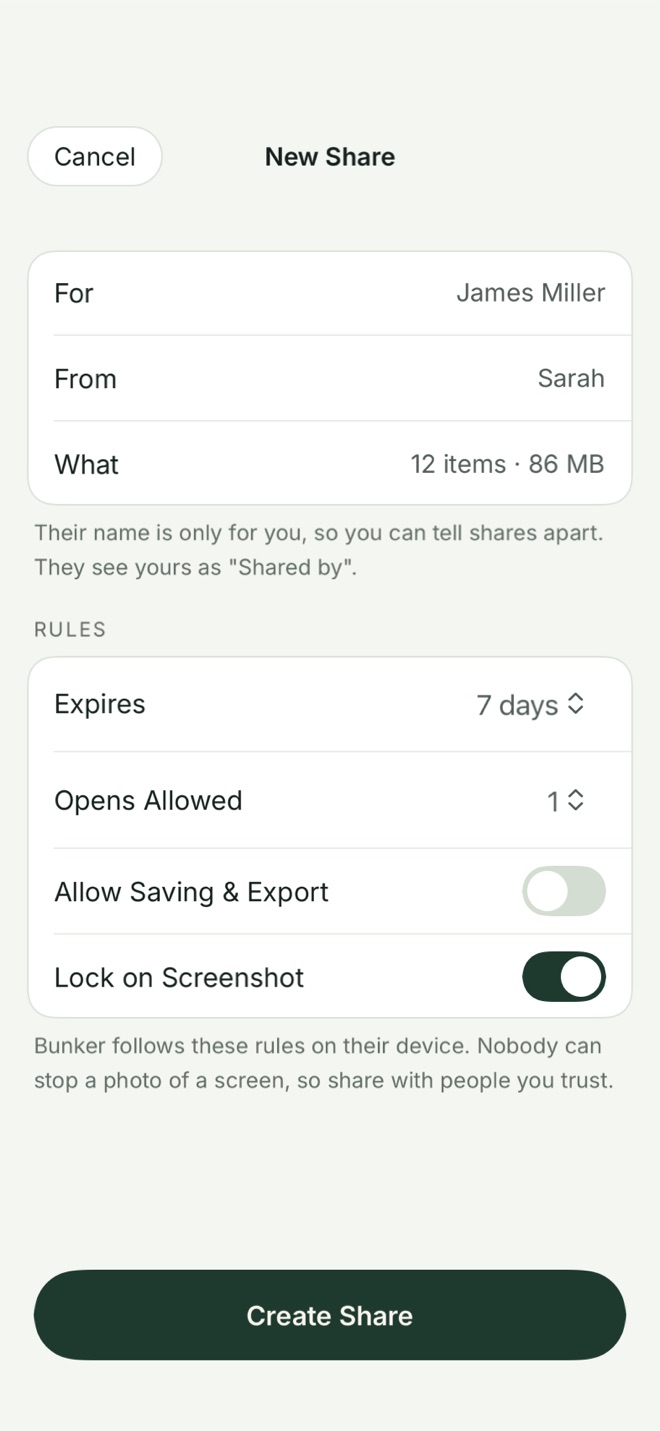
When you tap Create Share, Bunker makes a fresh random 256-bit key for this share alone, encrypts the shared items under it, and uploads them to Bunker’s public iCloud database under record names derived from that key. Without the key, nobody can find the records, and nobody can list them.
You then get the key in three forms:
- A link like
usebunker.app/s/#…. The key is after the#, in the part of a link browsers never send to a server. Our/s/page also removes it from the address bar at once. - A QR code, for someone next to you.
- A 24-word code, for reading aloud over the phone.
Send one of them through a channel you trust. For a phone call, the code avoids a link sitting in a message thread.
On the other side
The recipient taps the link (or chooses Open a Shared or Legacy Vault → Shared Vault and pastes or scans the code), sees what’s being shared, and draws a new Pattern for their copy. It then lives on their device like any vault, read-only, with a “Shared by Sarah” banner. Both of you need to be signed in to iCloud.
The rules
- Expires: never, 1 day, 7 days, 30 days, or a date you choose.
- Opens Allowed: unlimited, 1, 3 or 10.
- Allow Saving & Export: off by default.
- Lock on Screenshot: on by default; the copy locks if a screenshot or recording is detected.
These are rules Bunker follows on their device, and the screen says so. They can’t stop someone photographing the screen with another phone.
The first device to claim a link spends it, so a second person who finds the same link sees that it’s already been opened. That’s enforced by Bunker, not by the encryption: until you revoke the share or it expires, anyone holding the key could still decrypt the records. Per-recipient keys are planned for a later version.
Managing shares
Vault Sharing lists each share with its label and status: Waiting, Opened, Expired or Revoked. Each share is for one person and can be revoked on its own. Deleting the vault ends all its shares.
What it protects against
- Bunker, Apple and anyone else reading the shared items: they hold ciphertext without the key.
- Someone guessing their way to a share: the key is random, and the record names can’t be listed.
- A link forwarded after the first person opened it: Bunker won’t open it a second time.
What it doesn’t protect against
- Someone who gets the link, code or QR code before your recipient does. Treat it like the thing it unlocks.
- Browser history. If the link is opened in a browser, the key can stay in that browser’s history, which may sync through iCloud.
- What the recipient keeps. Revoking stops future access; it can’t take back what they downloaded, saved, exported or photographed.
- Linking shares to one person. iCloud stamps each public record with an anonymous ID for its creator, so someone holding one share’s record could tell whether two shares came from the same owner.
Free or Pro
Creating shares needs Bunker Pro. Receiving is free and unlimited, and received copies don’t count toward the Free limits. If Pro ends, shares you’ve made keep working; you just can’t make new ones.
Related
- Legacy Vaults, for a copy that opens only when several trusted people come together.
- Device sync, for your own devices.
- Pattern Encryption: how the recipient’s copy is protected on their device.
- How Bunker protects you.
Questions
Does the person I share with need Bunker Pro?
No. Anyone can receive and open a share on the free plan. Creating a share needs Bunker Pro.
Can they change or add to what I shared?
No. A share is a read-only copy. When you change the shared items, Bunker republishes them and the recipient's copy follows.
What happens when I revoke a share?
Future access stops, and the recipient's copy is deleted the next time they open it while online. Anything they already saved, exported or photographed can't be taken back.
Is there a size limit?
Yes, 500 MB per share in this version. Bunker shows the size before you create it.