Alternate App Icons
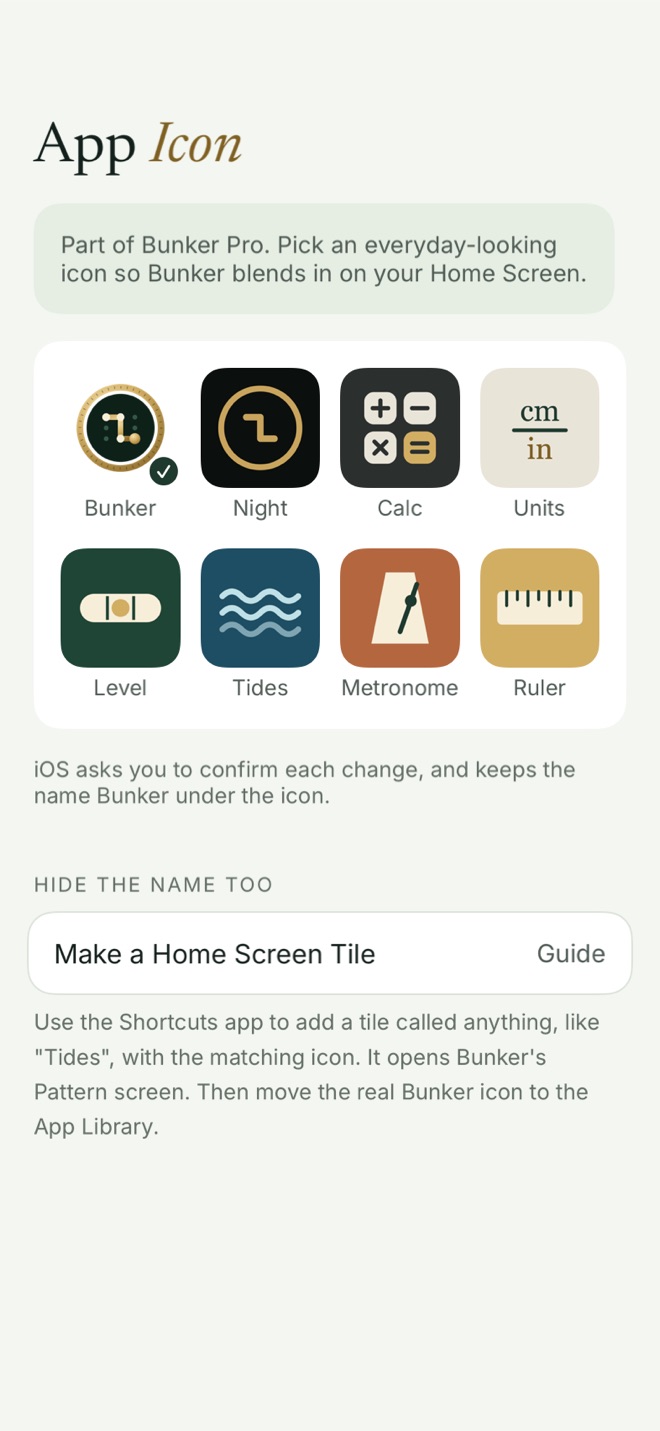
Alternate App Icons let you replace Bunker’s Home Screen icon with one of 7 everyday-looking designs, so the app doesn’t stand out when someone glances at your phone. They’re part of Bunker Pro, on iPhone and iPad, and they’re a disguise for casual looks, not a way to hide that Bunker is installed.
How it works
Go to App Settings → Appearance → App Icon and pick one:
- Calc, a calculator-style keypad
- Units, a unit converter
- Level, a spirit level
- Tides, waves
- Metronome
- Ruler
- Night, a dark version of Bunker’s own mark
All 7 are original designs in Bunker’s own style. None copies another app’s icon or uses an Apple app’s name.
When you choose one, iOS shows its own alert to confirm the change. Apps can’t skip it. The new icon shows on your Home Screen and in the App Library.
Whichever icon you choose, tapping it opens Bunker’s normal unlock screen. There’s no fake calculator in front of it.
Changing the name too
iOS always shows the name “Bunker” under an app’s icon, whatever icon the app picks. If you want a different name as well, App Settings → App Icon → Make a Home Screen Tile walks you through it:
- In the Shortcuts app, make a shortcut that opens Bunker.
- Add it to your Home Screen with any name, such as “Tides”, and the matching icon image.
- Move the real Bunker icon off your Home Screens, into the App Library.
Why we don’t build a fake calculator
Some vault apps pretend to be a working calculator and open when you type a code. We chose not to. A disguise that works only until someone types “2 + 2” is fragile, and it puts your real protection in the wrong place. Bunker’s protection is the encryption behind each Pattern and the fact that nothing reveals how many Hidden Vaults exist. The icon is just a way to be less noticeable.
What it protects against
- Someone glancing at your Home Screen, or swiping through your apps, and asking what “that vault app” is.
What it doesn’t protect against
Anyone who looks a little harder will find Bunker by name:
- Settings → Apps lists Bunker by name, with its storage use.
- Searching the phone for “Bunker” finds it.
- The App Store shows it in your purchase history, and its page says it’s installed.
- Screen Time and battery usage list it by name.
- iOS’s confirmation alert appears each time you change the icon.
- Notifications from Bunker carry its name, though their text never mentions vaults or items.
If someone checking your phone knowing what to look for is the risk you face, rely on a Duress Vault and Hidden Vaults, not the icon.
Free or Pro
Alternate App Icons are part of Bunker Pro. On Free you can see them all; choosing one opens the Bunker Pro sheet. You can always go back to the default icon. If Pro ends, the icon you chose stays until you change it.
Related
- Hidden Vaults: the protection that matters more than the icon.
- Duress Vault, for being made to open the app.
- Bunker vs calculator vault apps.
- Pattern Encryption.
Questions
Does the Calc icon open a working calculator?
No. Every icon opens Bunker's normal unlock screen. We don't build fake apps: a decoy that half-works tends to draw more attention, not less.
Will the name under the icon change?
No. iOS keeps the name Bunker under any icon an app chooses. App Settings → App Icon explains how to make a Home Screen tile with a different name using the Shortcuts app.
Why does iOS show an alert when I change the icon?
iOS confirms every icon change made by an app, and apps can't turn that off.
Are alternate icons available on the Mac?
No, only on iPhone and iPad.